Final video
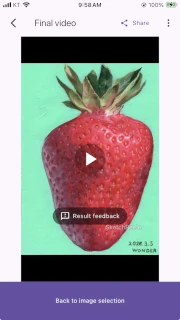
Check conversion progress and play or share the completed time-lapse video.
How to open it
Section titled “How to open it”If you are a subscriber, tap Convert in Video output to move to the final video screen.
If you are not subscribed, tapping Convert opens a dialog that explains the non-subscriber policy. Tap the dialog’s Confirm button to move to the final video screen.
Convert and play
Section titled “Convert and play”The app displays progress while the video is being converted.

When it is complete, you can play the video and move the playback position to review the result.
Tap Share to prepare the device share sheet.

Send feedback
Section titled “Send feedback”If you encounter a problem while using the app or have suggestions for improvement, tap the Result feedback button in the center of the screen to send Feedback to the developer at any time.

Next step
Section titled “Next step”Tap Return to image selection to return to Image selection and prepare the next video.