Image selection
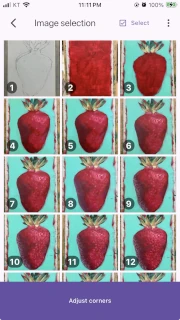
Add drawing-process photos for your time-lapse and check their order.
How to open it
Section titled “How to open it”Select a project in Project management. You can also return here after correcting corners.
Add and select photos
Section titled “Add and select photos”Use Add images to choose multiple photos at once. While they are processed, the app shows a processed / total images processing progress state.

In Select mode, choose individual photos or Select all, then delete them. Deleted photos cannot be restored after confirmation.
States and limits
Section titled “States and limits”- A video needs at least 3 photos, so
Image correctionstays disabled before then. - You may add 50 or more photos, but the app can show a memory-use warning.
- Adding photos is limited for demo projects, while processing photos, and in selection mode.
- If loading fails, read the message and try again.
Next step
Section titled “Next step”Once at least three photos are ready, select Image correction to continue to Image correction.